
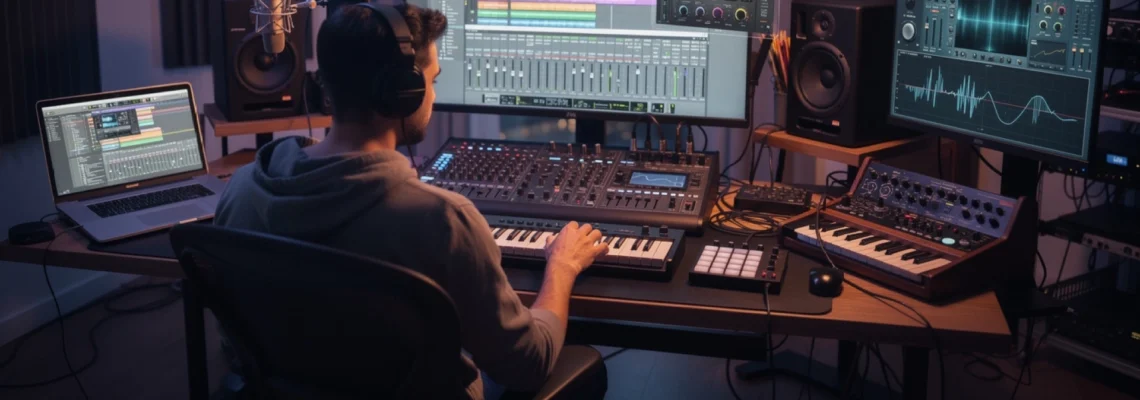
The landscape of music production has transformed dramatically over the past two decades, with software innovations becoming the cornerstone of modern creative workflows. Today’s producers, composers, and audio engineers rely on sophisticated digital tools that rival traditional hardware in both functionality and sonic quality. From bedroom producers crafting chart-topping hits to professional studios handling major label releases, the right creative software can make the difference between amateur-sounding demos and polished, radio-ready tracks.
Professional music production software encompasses a vast ecosystem of digital audio workstations, virtual instruments, processing plugins, and specialised tools designed to streamline every aspect of the creative process. These applications have democratised music creation, allowing artists to achieve studio-quality results without the overhead costs of traditional recording facilities. Understanding which software solutions best serve your specific needs can significantly accelerate your artistic development and enhance the overall quality of your musical output.
Digital audio workstations: core platforms for professional music production
Digital Audio Workstations represent the foundation of any serious music production setup, serving as the central hub where all creative elements converge. Modern DAWs have evolved far beyond simple multitrack recorders, incorporating advanced MIDI sequencing, comprehensive mixing capabilities, and sophisticated automation systems that enable producers to realise their most ambitious sonic visions.
The choice of DAW often defines a producer’s workflow methodology and can significantly influence the creative process itself. Each platform offers unique features and interface paradigms that cater to different production styles and musical genres. Whether you’re tracking live bands, programming electronic beats, or composing orchestral arrangements, selecting the appropriate DAW becomes crucial for maximising both efficiency and creative potential.
Pro tools HDX architecture and advanced MIDI implementation
Pro Tools remains the industry standard for professional audio production, particularly in commercial recording studios and post-production facilities. The HDX architecture provides unparalleled processing power and ultra-low latency monitoring, essential for large-scale productions involving numerous tracks and complex routing scenarios. Its advanced MIDI implementation supports sophisticated tempo mapping and groove quantisation features that maintain musical feel whilst ensuring technical precision.
The software’s comprehensive editing capabilities include industry-leading audio editing tools such as Elastic Audio for time-stretching and pitch correction, alongside robust automation systems that support complex parameter changes across multiple channels simultaneously. Pro Tools’ integration with professional hardware controllers and its extensive plugin compatibility make it the preferred choice for mixing engineers working on high-profile releases.
Logic pro X comprehensive sample libraries and flex time technology
Logic Pro X offers exceptional value for Mac users, combining professional-grade DAW functionality with an extensive collection of high-quality virtual instruments and sample libraries. The software includes over 70GB of content spanning orchestral instruments, vintage synthesisers, and modern production elements, eliminating the need for additional purchases when starting new projects. Its Flex Time technology provides intuitive audio quantisation and tempo adjustment capabilities without artifacts commonly associated with time-stretching algorithms.
The platform’s sophisticated MIDI editing environment features comprehensive piano roll editing, advanced quantisation options, and intelligent transposition tools that maintain harmonic relationships when adjusting musical passages. Logic’s built-in Drummer feature utilises artificial intelligence to generate realistic drum performances across various genres, whilst the comprehensive effects library includes vintage-modelled compressors, EQs, and spatial processors that rival expensive third-party alternatives.
Ableton live session view workflow and max for live integration
Ableton Live revolutionised music production with its unique Session View workflow, enabling non-linear composition and real-time performance capabilities that blur the boundaries between studio production and live performance. This approach allows producers to experiment with musical ideas in a loop-based environment, encouraging spontaneous creativity and rapid prototyping of song structures. The software’s intuitive warping algorithms automatically detect and adjust audio tempos, making it effortless to combine elements from different sources.
Max for Live integration extends Ableton’s capabilities exponentially, providing access to a visual programming environment where users can create custom instruments, effects, and utilities. This ecosystem has fostered an active community of developers who continuously contribute innovative tools and instruments. Ableton’s comprehensive automation system allows for precise parameter control over time, whilst its advanced sidechaining capabilities enable sophisticated dynamics processing essential for modern electronic music production.
Cubase expression maps and VariAudio pitch correction tools
Cubase stands
Cubase stands out for composers and arrangers who demand deep control over MIDI articulation and realistic performance nuances. Its Expression Maps system enables you to switch between different playing styles—such as legato, staccato, or pizzicato—on a single instrument track without creating multiple lanes or complex routing. This makes large template management far more efficient, particularly for film scoring and orchestral mock-ups where dozens of articulations may be required for each instrument section.
The VariAudio pitch correction tools provide an integrated alternative to third-party tuning plugins, offering detailed control over pitch, timing, and formants directly within the audio editor. You can manipulate individual notes as if they were MIDI events, adjust vibrato, and tighten timing while preserving a natural sound. Combined with Cubase’s advanced chord track and harmony features, VariAudio allows you to experiment with reharmonisation and vocal layering in ways that would be cumbersome in less sophisticated environments.
Studio one drag-and-drop interface and integrated mastering suite
Studio One has gained significant traction among professional producers thanks to its streamlined, drag-and-drop interface and efficient workflow design. Almost every task—from loading instruments and effects to routing sends and creating buses—can be accomplished by simply dragging elements onto the arrangement or mixer. This reduces menu-diving and allows you to stay focused on the creative aspects of music production rather than technical configuration.
One of Studio One’s standout features is its integrated mastering suite, which lives within the same application as your production environment. You can move seamlessly from songwriting and arrangement to mixing and final mastering without switching software or exporting stems. When you update a mix, the mastering project automatically reflects the changes, ensuring consistency across an entire EP or album. For independent artists looking to manage the full lifecycle of a release, this unified environment can dramatically speed up delivery while maintaining professional audio quality.
Virtual instruments and sample libraries for enhanced sound design
While your DAW forms the backbone of your setup, virtual instruments and sample libraries provide the sonic palette that defines your musical identity. Modern software instruments rival—and often surpass—hardware in terms of flexibility, sound quality, and recall ability. Whether you are designing experimental textures, realistic orchestral arrangements, or genre-specific drum kits, the right creative software for music production can expand your sound design capabilities in ways that would have been impossible a decade ago.
High-end virtual instruments combine deeply sampled content with advanced synthesis engines, scripting, and modulation systems. This combination allows you to move beyond static presets and craft signature sounds tailored to your projects. By understanding how these instruments are architected under the hood, you can make more informed choices about which tools belong in your core template and how to integrate them efficiently into your workflow.
Native instruments kontakt scripting and custom instrument development
Native Instruments Kontakt remains the de facto standard platform for sample-based instruments, powering everything from boutique acoustic pianos to cinematic sound design toolkits. At its core, Kontakt offers a highly optimised playback engine with sophisticated voice management, round-robin cycling, and dynamic crossfading, all of which contribute to lifelike, expressive performances. For most users, the factory library and third-party Kontakt instruments already provide a vast range of sounds ready for immediate use in professional productions.
Where Kontakt truly shines, however, is in its scripting engine, which enables developers and advanced users to create custom behaviours and performance features. Through KSP (Kontakt Script Processor), you can implement intelligent legato, complex articulation switching, generative pattern sequencers, and detailed performance controls mapped to MIDI CCs. Even if you never write a line of code yourself, understanding that scripting underpins many premium Kontakt libraries helps you evaluate which products will offer the deepest musical expression and long-term value.
Spectrasonics omnisphere granular synthesis and modulation matrix
Spectrasonics Omnisphere is often described as a hybrid between a synth and a sample library, making it one of the most versatile tools for sound design in modern music production. Its granular synthesis engine allows you to transform simple audio samples into evolving atmospheres, glitchy textures, and complex pads by breaking the audio into tiny grains and manipulating their playback in real time. This approach can turn even mundane source material into rich, cinematic soundscapes that cut through dense mixes.
The modulation matrix within Omnisphere serves as the central brain for shaping movement and dynamics. You can route virtually any modulation source—LFOs, envelopes, performance controls, or even audio-rate modulators—to multiple destinations across the engine. Think of it like a patch bay in a modular synth, but with the convenience of digital recall and advanced visual feedback. By assigning macros and MIDI controllers to key parameters, you can perform intricate sonic morphs live or automate them within your DAW for evolving, expressive sound design.
East west hollywood orchestra diamond edition articulation mapping
For composers working in film, television, and game audio, the East West Hollywood Orchestra Diamond Edition is a flagship orchestral library designed for detailed, realistic mock-ups. The library captures multiple microphone positions—such as close, mid, and surround—allowing you to sculpt the perceived distance and depth of the orchestra within your mix. This multi-mic architecture is especially valuable when integrating orchestral elements with live recordings or dense hybrid scores.
Effective use of articulation mapping is crucial with such a comprehensive library. Each instrument provides a wide range of articulations, from subtle legato and portamento transitions to aggressive spiccato and col legno effects. By assigning key-switches, MIDI CCs, or host-based articulation maps (such as Cubase Expression Maps or Logic Articulation Sets), you can switch seamlessly between these playing styles within a single MIDI performance. This keeps your sessions manageable while ensuring that every musical phrase reflects the nuance and realism of a live orchestra.
Arturia V collection vintage synthesiser emulations and CV connectivity
Arturia’s V Collection offers meticulously modelled emulations of iconic analogue and digital synthesisers, bringing classic instruments like the Prophet-5, Juno-60, and DX7 into your DAW. These emulations capture not only the tonal characteristics of the original hardware but also its idiosyncrasies—subtle oscillator drift, filter non-linearities, and saturation that give vintage synths their musical charm. For producers aiming to incorporate retro flavours into modern arrangements, this collection provides a cohesive toolkit that covers everything from lush pads to punchy basses.
Many instruments in the V Collection also support CV (control voltage) connectivity when used with compatible hardware interfaces, enabling hybrid setups that bridge the gap between software and modular or semi-modular synths. This means you can, for example, use a software step sequencer to modulate parameters on a hardware Eurorack system, or process external analogue signals through Arturia’s virtual filters and effects. By treating these emulations as part of a broader ecosystem rather than isolated plugins, you can craft highly expressive, performance-oriented workflows that combine the best aspects of both digital and analogue domains.
Audio processing plugins and real-time effects architecture
Once your core musical ideas and sound design elements are in place, audio processing plugins shape the final character, clarity, and impact of your mix. From corrective equalisation and transparent compression to creative distortion and spatial effects, these tools function like a virtual rack of outboard hardware—except with instant recall, automation, and far greater routing flexibility. The quality of your processing chain can be the deciding factor between a cluttered, fatiguing mix and a polished, professional master.
Modern effects architectures often offer both zero-latency and linear phase modes, oversampling options, and internal routing matrices. Understanding when to prioritise low latency—such as during tracking or live performance—and when to accept additional processing overhead for higher fidelity is essential. By combining a small number of high-quality processors with good monitoring and critical listening skills, you can achieve results that compete with commercial releases without relying on endless plugin chains.
Fabfilter Pro-Q 3 dynamic EQ and linear phase processing
FabFilter Pro-Q 3 has become a staple in professional studios due to its intuitive interface and highly flexible equalisation capabilities. You can create up to 24 bands, each configurable as bell, shelf, notch, or more specialised filter types, and visualise frequency content in real time via the built-in spectrum analyser. The EQ’s linear phase and natural phase modes allow you to choose between maximum phase coherence—ideal for mastering—and more analogue-like responses suitable for mixing individual tracks.
One of Pro-Q 3’s most powerful features is its dynamic EQ functionality, which lets each band respond to the incoming audio signal similarly to a multiband compressor but with far greater precision. For example, you can tame harsh vocal resonances only when they become problematic, or control low-end build-up in a bass-heavy mix without permanently cutting valuable energy. Pro-Q 3 also supports per-band mid/side processing and collision detection, which highlights overlapping frequencies between tracks and helps you carve out space in the mix more efficiently.
Waves SSL G-Master buss compressor analogue modelling technology
The Waves SSL G-Master Buss Compressor emulates the legendary mix bus compressor found on classic Solid State Logic consoles, long revered for its ability to “glue” a mix together. By applying gentle, program-dependent compression across the stereo bus, this processor can enhance cohesion, punch, and perceived loudness without sacrificing dynamics when used judiciously. Many engineers place it on the master bus early in the mix process to shape how elements interact from the outset.
Under the hood, Waves utilises analogue modelling technology to replicate the behaviour of the original VCA circuitry, including its distinctive attack and release curves. While the plugin is light on CPU, it offers enough control to adapt to a wide range of genres—from subtle bus compression in acoustic or jazz productions to more assertive settings in rock and electronic music. The key is moderation: by aiming for just 1–3 dB of gain reduction on peaks, you can achieve the signature SSL “glue” effect without overcompressing your mix.
Universal audio UAD-2 DSP acceleration and unison preamp technology
Universal Audio’s UAD-2 platform leverages dedicated DSP (Digital Signal Processing) hardware to offload plugin processing from your computer’s CPU. This architecture allows you to run highly detailed analogue emulations—such as tape machines, channel strips, and vintage compressors—without compromising system performance. For producers working with large sessions or high sample rates, this can be the difference between a smooth mixing experience and constant buffer size adjustments and dropouts.
Unison preamp technology, available on compatible Apollo interfaces, takes this concept a step further by modelling both the tone and impedance of classic hardware preamps at the input stage. In practice, this means you can track vocals through a virtual Neve, API, or SSL channel strip, capturing the desired colour and dynamic behaviour as you record. When paired with low-latency monitoring, Unison effectively turns your interface into a flexible, high-end front end, bringing much of the traditional studio workflow into a compact, portable format.
Izotope ozone 10 AI-powered mastering and spectral shaping
iZotope Ozone 10 is a comprehensive mastering suite that combines traditional processing modules—EQ, compression, limiting, and more—with AI-assisted workflows. Its Master Assistant analyses your track and suggests starting points for tonal balance, loudness, and dynamic range based on genre-appropriate references. While it should not replace critical listening or professional judgement, this feature can accelerate your workflow and provide useful benchmarks, especially when working in unfamiliar styles.
Ozone’s spectral shaping tools, such as the Spectral Shaper and Dynamic EQ, allow you to target specific frequency regions with surgical precision. For instance, you can smooth out harsh cymbals, tame sibilance in the upper midrange, or control low-end boom without affecting the rest of the spectrum. The suite’s maximiser includes multiple limiting algorithms designed to achieve competitive loudness levels while minimising distortion and pumping. Used thoughtfully, Ozone can help you deliver consistent, translation-friendly masters that hold up across streaming platforms, club systems, and consumer headphones.
Hardware integration software for analogue-digital hybrid workflows
Many modern producers operate in hybrid studios that combine the tactile feel and sonic character of analogue gear with the precision and recall of digital systems. Hardware integration software sits at the heart of these setups, ensuring that external processors, synths, and effects units behave like first-class citizens within your DAW. When configured correctly, you can enjoy the best of both worlds: analogue warmth and depth, with the convenience of total recall and synchronised automation.
Common solutions include plugin-based hardware controllers that manage send and return levels, latency compensation, and preset recall for outboard gear. Some DAWs offer native hardware insert functionality, allowing you to treat external processors like standard plugins on your channel strip. Others rely on dedicated software—such as Universal Audio Console, Focusrite Control, or hardware-specific editors—to handle routing and configuration. By standardising your I/O assignments and saving templates, you can recall complex hybrid setups in seconds, rather than manually re-patching for every project.
Collaborative music production platforms and cloud-based DAW solutions
As remote collaboration becomes the norm rather than the exception, cloud-based tools for music production have evolved from niche utilities into essential components of professional workflows. Collaborative platforms enable you to share sessions, stems, and project files with co-writers, mix engineers, and clients anywhere in the world. Instead of endlessly emailing large files or managing multiple project versions, you can centralise assets in a secure, version-controlled environment.
Cloud-integrated DAWs and services offer features such as real-time co-editing, comment tracks, and automatic backup, reducing the risk of data loss and miscommunication. Some platforms allow you to stream high-quality audio directly from your session to collaborators for feedback, while others integrate with version control systems to track changes over time. For producers juggling multiple projects and teams, these tools not only save time but also create a transparent workflow where everyone can see the most current state of a track.
Specialised audio editing software for post-production and sound design
Beyond the capabilities of general-purpose DAWs, specialised audio editors play a crucial role in tasks that require frame-accurate precision and advanced analysis tools. Applications like Audacity, Steinberg WaveLab, and iZotope RX excel at detailed waveform editing, restoration, and forensic-level processing. If you are working on podcasts, sound design for picture, or archival remastering, these dedicated environments can offer functionality that would be cumbersome or impossible to achieve inside a traditional DAW timeline.
Advanced features may include spectral editing, click and hum removal, dialogue isolation, and batch processing for large numbers of files. For example, iZotope RX’s spectral repair tools let you visually identify and remove unwanted noises—such as coughs, car horns, or chair squeaks—without affecting surrounding audio, much like using a photo editor to retouch a single pixel. By incorporating specialised audio editing software into your toolkit, you can deliver cleaner, more professional results and tackle complex post-production challenges with confidence.